Elastic Security
| Version | 0.7.1
|
| Managed integration release status | GA |
| Subscription level What's this? |
Basic |
| Developed by What's this? |
Elastic |
| Ingestion method(s) | API |
| Minimum Kibana version(s) | 9.4.0 |
You can use this integration as an Elastic Managed integration on Elastic Cloud Hosted deployments running this version or later.
To use pre-release integrations, go to the Integrations page in Kibana, scroll down, and toggle on the Display beta integrations option.
Elastic Security is a free and open solution that helps detect, investigate, and respond to threats using data from endpoints, cloud, and network sources. It offers SIEM and endpoint protection with powerful search, correlation, and visualization features in Kibana. It enables security teams to streamline investigations and strengthen their overall security posture.
The Elastic Security integration collects the following events:
alert: - Retrieve alerts from Elasticsearch Instance using Elasticsearch _search API.
Elastic Managed integrations are only supported on Elastic Cloud Serverless and Elastic Cloud Hosted deployments. An Elastic Managed integration lets you ingest data from a cloud source while avoiding the orchestration, management, and maintenance associated with standard ingest infrastructure. Elastic runs the collector for you, so you can focus on your data instead of the infrastructure that collects it.
For more information, refer to Elastic Managed integrations and the Elastic Managed integrations FAQ.
Elastic Agent must be installed. For more details, check the Elastic Agent installation instructions. You can install only one Elastic Agent per host.
You will need the following information:
- The URL for the Elasticsearch instance.
- Authentication credentials such as username, password, API key, or bearer token depending on the selected authentication type.
Note:
- Users must have
readindex privileges on the.alerts-security.alerts-<space_id>indices to access and query security alerts. - To learn how to create authentication credentials and use the appropriate authentication type, refer to the Elasticsearch Authentication Documentation.
- In the top search bar in Kibana, search for Integrations.
- In the search top bar, type Elastic Security.
- Select the Elastic Security integration and add it.
- Add all the required integration configuration parameters such as username, password, API key, or bearer token depending on the selected authentication type to enable data collection.
- Select "Save and continue" to save the integration.
This is the alert dataset.
Example
{
    "@timestamp": "2022-06-09T13:56:03.205Z",
    "Endpoint": {
        "policy": {
            "applied": {
                "artifacts": {
                    "global": {
                        "identifiers": {
                            "name": "diagnostic-configuration-v1",
                            "sha256": "BBBBB40ca79cf0e165053daac3e4df8b428dea81c8d20edefca330d77bc0958c1"
                        },
                        "snapshot": "latest",
                        "update_age": 0,
                        "version": "1.0.1049"
                    },
                    "user": {
                        "identifiers": {
                            "name": "endpoint-blocklist-linux-v1",
                            "sha256": "d801aacc330a5e3173372ea6af4a3d08ec58074478e85aa5603e926658"
                        },
                        "version": "1.0.0"
                    }
                }
            }
        }
    },
    "Events": {
        "@timestamp": "2022-06-09T13:52:06.971Z",
        "_label": "script_executed",
        "_state": 0,
        "event": {
            "action": "exec",
            "category": "process",
            "created": "2024-06-09T13:52:06.971Z",
            "id": "Na7UF0/g6QHP1vOo++++3Y8t",
            "kind": "event",
            "outcome": "unknown",
            "type": "start"
        },
        "group": {
            "Ext": {
                "real": {
                    "id": 1006,
                    "name": "admin"
                }
            },
            "id": 1006,
            "name": "admin"
        },
        "message": "Endpoint process event",
        "user": {
            "Ext": {
                "real": {
                    "id": 1005,
                    "name": "admin"
                }
            },
            "id": 1005,
            "name": "admin"
        }
    },
    "Responses": {
        "@timestamp": "2022-06-09T13:52:07.403Z",
        "action": {
            "action": "kill_process",
            "field": "process.entity_id",
            "state": 0
        },
        "message": "Success",
        "process": {
            "entity_id": "YyyyyyyYtNTEzYi00NTI2LWEzNGEtZTIyOWE2ZjE1ZGZmLTE0MTIwNi0xNzE3OTQxMTI2",
            "name": "bash",
            "pid": 141206
        },
        "result": 0
    },
    "agent": {
        "build": {
            "original": "version: 8.13.0, compiled: Wed Mar 20 20:00:00 2022, branch: HEAD, commit: f90579240155fc17f659ed37f7864ab1194ed2ea"
        },
        "id": "abcd-513b-4526-a34a-e229a6f15dff",
        "type": "endpoint",
        "version": "8.13.0"
    },
    "data_stream": {
        "dataset": "elastic_security.alert",
        "namespace": "26200",
        "type": "logs"
    },
    "ecs": {
        "version": "8.10.0"
    },
    "elastic": {
        "agent": {
            "id": "abcd-513b-4526-a34a-e229a6f15dff"
        }
    },
    "elastic_agent": {
        "id": "28870b7e-2a76-4fb1-a0de-0297b760c364",
        "snapshot": false,
        "version": "9.4.0"
    },
    "event": {
        "action": "rule_detection",
        "agent_id_status": "mismatch",
        "category": [
            "malware",
            "intrusion_detection"
        ],
        "code": "behavior",
        "created": "2024-06-09T13:52:07.402Z",
        "dataset": "elastic_security.alert",
        "id": "Na7UF0/g6Q++++3Y96",
        "ingested": "2026-07-14T10:42:47Z",
        "kind": "alert",
        "module": "elastic_security",
        "outcome": "success",
        "risk_score": 73,
        "sequence": 600720,
        "severity": 73,
        "type": [
            "info",
            "allowed"
        ]
    },
    "group": {
        "Ext": {
            "real": {
                "id": 1006,
                "name": "admin"
            }
        },
        "id": "1006",
        "name": "admin"
    },
    "host": {
        "architecture": "x86_64",
        "hostname": "siem-linux-release-sec-bis",
        "id": "aaaad59dd2c858c4f9b5d50c4a0e7d7",
        "ip": [
            "127.0.0.1",
            "::1",
            "89.160.20.156"
        ],
        "mac": [
            "AA-FF-AA-FF-00-02"
        ],
        "name": "siem-linux-release-sec-bis",
        "os": {
            "Ext": {
                "variant": "Debian"
            },
            "family": "debian",
            "full": "Debian 11.9",
            "kernel": "5.10.0-29-cloud-amd64 #1 SMP Debian 5.10.216-1 (2024-05-03)",
            "name": "Linux",
            "platform": "debian",
            "type": "linux",
            "version": "11.9"
        },
        "risk": {
            "calculated_level": "Critical",
            "calculated_score_norm": 98.00494
        }
    },
    "input": {
        "type": "cel"
    },
    "kibana": {
        "alert": {
            "ancestors": {
                "depth": 0,
                "id": "f3PTBcu",
                "index": ".ds-logs-endpoint.alerts-default-2024.05.18-002",
                "type": "event"
            },
            "depth": 1,
            "last_detected": "2022-06-09T13:56:03.235Z",
            "original_event": {
                "action": "rule_detection",
                "agent_id_status": "verified",
                "category": [
                    "malware",
                    "intrusion_detection"
                ],
                "code": "behavior",
                "created": "2024-06-09T13:52:07.402627721Z",
                "dataset": "endpoint.alerts",
                "id": "Na7UF0/abcddd++++3Y96",
                "ingested": "2024-06-09T13:52:08Z",
                "kind": "alert",
                "module": "endpoint",
                "outcome": "success",
                "risk_score": 73,
                "sequence": 600720,
                "severity": 73,
                "type": [
                    "info",
                    "allowed"
                ]
            },
            "original_time": "2024-06-09T13:52:07.402Z",
            "reason": "malware, intrusion_detection event with process bash, parent process python3, by admin on siem-linux-release-sec-bis created high alert Malicious Behavior Prevention Alert: Empire Stager Execution.",
            "risk_score": 73,
            "rule": {
                "author": "Elastic",
                "category": "Custom Query Rule",
                "consumer": "siem",
                "created_at": "2024-04-18T11:06:23.900Z",
                "created_by": "elastic",
                "description": "Generates a detection alert each time an Elastic Endpoint Security alert is received. Enabling this rule allows you to immediately begin investigating your Endpoint alerts.",
                "enabled": true,
                "exceptions_list": {
                    "id": "endpoint_list",
                    "list_id": "endpoint_list",
                    "namespace_type": "agnostic",
                    "type": "endpoint"
                },
                "execution": {
                    "uuid": "abcd-fda4-40dc-8586-f3d0fa908bc4"
                },
                "from": "now-10m",
                "immutable": true,
                "indices": "logs-endpoint.alerts-*",
                "interval": "5m",
                "license": "Elastic License v2",
                "max_signals": 10000,
                "name": "Malicious Behavior Prevention Alert: Empire Stager Execution",
                "parameters": {
                    "author": "Elastic",
                    "description": "Generates a detection alert each time an Elastic Endpoint Security alert is received. Enabling this rule allows you to immediately begin investigating your Endpoint alerts.",
                    "from": "now-10m",
                    "immutable": true,
                    "index": "logs-endpoint.alerts-*",
                    "language": "kuery",
                    "license": "Elastic License v2",
                    "max_signals": 10000,
                    "query": "event.kind:alert and event.module:(endpoint and not endgame)\n",
                    "risk_score": 47,
                    "risk_score_mapping": {
                        "field": "event.risk_score",
                        "operator": "equals"
                    },
                    "rule_id": "abcdef-0b5f-4c3d-8305-a268d404c306",
                    "rule_name_override": "message",
                    "setup": "## Setup\n\nThis rule is configured to generate more **Max alerts per run** than the default 1000 alerts per run set for all rules. This is to ensure that it captures as many alerts as possible.\n\n**IMPORTANT:** The rule's **Max alerts per run** setting can be superseded by the xpack.alerting.rules.run.alerts.max Kibana config setting, which determines the maximum alerts generated by _any_ rule in the Kibana alerting framework. For example, if xpack.alerting.rules.run.alerts.max is set to 1000, this rule will still generate no more than 1000 alerts even if its own **Max alerts per run** is set higher.\n\nTo make sure this rule can generate as many alerts as it's configured in its own **Max alerts per run** setting, increase the xpack.alerting.rules.run.alerts.max system setting accordingly.\n\n**NOTE:** Changing xpack.alerting.rules.run.alerts.max is not possible in Serverless projects.",
                    "severity": "medium",
                    "severity_mapping": {
                        "field": "event.severity",
                        "operator": "equals",
                        "severity": "low",
                        "value": "21"
                    },
                    "timestamp_override": "event.ingested",
                    "to": "now",
                    "type": "query",
                    "version": 103
                },
                "producer": "siem",
                "revision": 1,
                "risk_score": 47,
                "risk_score_mapping": {
                    "field": "event.risk_score",
                    "operator": "equals"
                },
                "rule_id": "9a1a2dae-0b5f-4c3d-8305-a268d404c306",
                "rule_name_override": "message",
                "rule_type_id": "siem.queryRule",
                "severity": "medium",
                "severity_mapping": {
                    "field": "event.severity",
                    "operator": "equals",
                    "severity": "low",
                    "value": "21"
                },
                "tags": "Data Source: Elastic Defend",
                "timestamp_override": "event.ingested",
                "to": "now",
                "type": "query",
                "updated_at": "2024-05-20T01:03:43.962Z",
                "updated_by": "elastic",
                "uuid": "abcd-3ea9-4695-9a1b-4af87bead73e",
                "version": 103
            },
            "severity": "high",
            "start": "2022-06-09T13:56:03.235Z",
            "status": "active",
            "url": "https://release-app/app/security/alerts/redirect/abcd?index=.alerts-security.alerts-default×tamp=2024-06-09T13:56:03.205Z",
            "uuid": "abcdef123",
            "workflow_status": "open"
        },
        "space_ids": "default",
        "version": "8.14.0"
    },
    "message": "Malicious Behavior Prevention Alert: Empire Stager Execution",
    "process": {
        "args": [
            "/tmp/bash",
            "exec(base64.b64decode*abcdef)"
        ],
        "args_count": 2,
        "command_line": "/tmp/bash exec(base64.b64decode*abcdef)",
        "entity_id": "YYYYYYYYYtNTEzYi00NTI2LWEzNGEtZTIyOWE2ZjE1ZGZmLTE0MTIwNi0xNzE3OTQxMTI2",
        "executable": "/tmp/bash",
        "group": {
            "id": "1006",
            "name": "admin"
        },
        "hash": {
            "md5": "ABCDf2d21a340f2b3ee534fba5b29e417",
            "sha1": "ABCDc728d069ba6239c1da751a2f31fba9b1aa",
            "sha256": "ABCD3091f6093bd9a7b308e536fbc285aeef2c5139577cc96bc594a4845f0e13"
        },
        "name": "bash",
        "real_group": {
            "id": "1006",
            "name": "admin"
        },
        "supplemental_groups": {
            "id": "4",
            "name": "adm"
        },
        "user": {
            "id": "1005",
            "name": "admin"
        }
    },
    "rule": {
        "description": "Identifies when a script interpreter executes a base64-encoded Empire stager. Empire is penetration testing software that is often utilized by attackers.",
        "id": "ABCD-82ff-4743-9e07-1c6901b1f0ea",
        "name": "Empire Stager Execution",
        "reference": [
            "https://github.com/abc/emp",
            "https://github.com/BC-abcd/emp"
        ],
        "ruleset": "production",
        "version": "1.0.29"
    },
    "source_metadata": {
        "_id": "xyzxyz123",
        "_index": "efgh_1234"
    },
    "tags": [
        "preserve_original_event",
        "forwarded",
        "elastic_security-alert"
    ],
    "threat": {
        "framework": "MITRE ATT&CK",
        "tactic": {
            "id": "TA0011",
            "name": "Command and Control",
            "reference": "https://attack.mitre.org/tactics/TA0011/"
        },
        "technique": {
            "id": "T1132",
            "name": "Data Encoding",
            "reference": "https://attack.mitre.org/techniques/T1132/",
            "subtechnique": {
                "id": "T1132.001",
                "name": "Standard Encoding",
                "reference": "https://attack.mitre.org/techniques/T1132/001/"
            }
        }
    },
    "user": {
        "Ext": {
            "real": {
                "id": 1005,
                "name": "admin"
            }
        },
        "id": "1005",
        "name": "admin",
        "risk": {
            "calculated_level": "Critical",
            "calculated_score_norm": 98.13564
        }
    }
}
Exported fields
| Field | Description | Type |
|---|---|---|
| @timestamp | Event timestamp. | date |
| Endpoint.policy.applied.artifacts.global.identifiers.name | keyword | |
| Endpoint.policy.applied.artifacts.global.identifiers.sha256 | keyword | |
| Endpoint.policy.applied.artifacts.global.snapshot | keyword | |
| Endpoint.policy.applied.artifacts.global.update_age | long | |
| Endpoint.policy.applied.artifacts.global.version | keyword | |
| Endpoint.policy.applied.artifacts.user.identifiers.name | keyword | |
| Endpoint.policy.applied.artifacts.user.identifiers.sha256 | keyword | |
| Endpoint.policy.applied.artifacts.user.version | keyword | |
| Events.@timestamp | date | |
| Events._label | keyword | |
| Events._state | long | |
| Events.event.action | keyword | |
| Events.event.category | keyword | |
| Events.event.created | date | |
| Events.event.id | keyword | |
| Events.event.kind | keyword | |
| Events.event.outcome | keyword | |
| Events.event.type | keyword | |
| Events.group.Ext.real.id | long | |
| Events.group.Ext.real.name | keyword | |
| Events.group.id | long | |
| Events.group.name | keyword | |
| Events.message | keyword | |
| Events.process.Ext.ancestry | keyword | |
| Events.process.args | keyword | |
| Events.process.args_count | long | |
| Events.process.command_line | keyword | |
| Events.process.entity_id | keyword | |
| Events.process.entry_leader.args | keyword | |
| Events.process.entry_leader.args_count | long | |
| Events.process.entry_leader.entity_id | keyword | |
| Events.process.entry_leader.entry_meta.type | keyword | |
| Events.process.entry_leader.executable | keyword | |
| Events.process.entry_leader.group.id | long | |
| Events.process.entry_leader.group.name | keyword | |
| Events.process.entry_leader.interactive | boolean | |
| Events.process.entry_leader.name | keyword | |
| Events.process.entry_leader.parent.entity_id | keyword | |
| Events.process.entry_leader.parent.pid | long | |
| Events.process.entry_leader.parent.start | date | |
| Events.process.entry_leader.pid | long | |
| Events.process.entry_leader.real_group.id | long | |
| Events.process.entry_leader.real_group.name | keyword | |
| Events.process.entry_leader.real_user.id | long | |
| Events.process.entry_leader.real_user.name | keyword | |
| Events.process.entry_leader.same_as_process | boolean | |
| Events.process.entry_leader.start | date | |
| Events.process.entry_leader.user.id | long | |
| Events.process.entry_leader.user.name | keyword | |
| Events.process.entry_leader.working_directory | keyword | |
| Events.process.executable | keyword | |
| Events.process.group.id | long | |
| Events.process.group.name | keyword | |
| Events.process.group_leader.args | keyword | |
| Events.process.group_leader.args_count | long | |
| Events.process.group_leader.entity_id | keyword | |
| Events.process.group_leader.executable | keyword | |
| Events.process.group_leader.group.id | long | |
| Events.process.group_leader.group.name | keyword | |
| Events.process.group_leader.interactive | boolean | |
| Events.process.group_leader.name | keyword | |
| Events.process.group_leader.pid | long | |
| Events.process.group_leader.real_group.id | long | |
| Events.process.group_leader.real_group.name | keyword | |
| Events.process.group_leader.real_user.id | long | |
| Events.process.group_leader.real_user.name | keyword | |
| Events.process.group_leader.same_as_process | boolean | |
| Events.process.group_leader.start | date | |
| Events.process.group_leader.supplemental_groups.id | long | |
| Events.process.group_leader.supplemental_groups.name | keyword | |
| Events.process.group_leader.user.id | long | |
| Events.process.group_leader.user.name | keyword | |
| Events.process.group_leader.working_directory | keyword | |
| Events.process.hash.md5 | keyword | |
| Events.process.hash.sha1 | keyword | |
| Events.process.hash.sha256 | keyword | |
| Events.process.interactive | boolean | |
| Events.process.name | keyword | |
| Events.process.parent.args | keyword | |
| Events.process.parent.args_count | long | |
| Events.process.parent.command_line | keyword | |
| Events.process.parent.entity_id | keyword | |
| Events.process.parent.executable | keyword | |
| Events.process.parent.group.id | long | |
| Events.process.parent.group.name | keyword | |
| Events.process.parent.interactive | boolean | |
| Events.process.parent.name | keyword | |
| Events.process.parent.pid | long | |
| Events.process.parent.real_group.id | long | |
| Events.process.parent.real_group.name | keyword | |
| Events.process.parent.real_user.id | long | |
| Events.process.parent.real_user.name | keyword | |
| Events.process.parent.start | keyword | |
| Events.process.parent.supplemental_groups.id | long | |
| Events.process.parent.supplemental_groups.name | keyword | |
| Events.process.parent.user.id | long | |
| Events.process.parent.user.name | keyword | |
| Events.process.parent.working_directory | keyword | |
| Events.process.pid | long | |
| Events.process.previous.args | keyword | |
| Events.process.previous.args_count | long | |
| Events.process.previous.executable | keyword | |
| Events.process.real_group.id | long | |
| Events.process.real_group.name | keyword | |
| Events.process.real_user.id | long | |
| Events.process.real_user.name | keyword | |
| Events.process.session_leader.args | keyword | |
| Events.process.session_leader.args_count | long | |
| Events.process.session_leader.entity_id | keyword | |
| Events.process.session_leader.executable | keyword | |
| Events.process.session_leader.group.id | long | |
| Events.process.session_leader.group.name | keyword | |
| Events.process.session_leader.interactive | boolean | |
| Events.process.session_leader.name | keyword | |
| Events.process.session_leader.pid | long | |
| Events.process.session_leader.real_group.id | long | |
| Events.process.session_leader.real_group.name | keyword | |
| Events.process.session_leader.real_user.id | long | |
| Events.process.session_leader.real_user.name | keyword | |
| Events.process.session_leader.same_as_process | boolean | |
| Events.process.session_leader.start | keyword | |
| Events.process.session_leader.supplemental_groups.id | long | |
| Events.process.session_leader.supplemental_groups.name | keyword | |
| Events.process.session_leader.user.id | long | |
| Events.process.session_leader.user.name | keyword | |
| Events.process.session_leader.working_directory | keyword | |
| Events.process.start | keyword | |
| Events.process.supplemental_groups.id | long | |
| Events.process.supplemental_groups.name | keyword | |
| Events.process.user.id | long | |
| Events.process.user.name | keyword | |
| Events.process.working_directory | keyword | |
| Events.user.Ext.real.id | long | |
| Events.user.Ext.real.name | keyword | |
| Events.user.id | long | |
| Events.user.name | keyword | |
| Responses.@timestamp | date | |
| Responses.action.action | keyword | |
| Responses.action.field | keyword | |
| Responses.action.state | long | |
| Responses.message | keyword | |
| Responses.process.entity_id | keyword | |
| Responses.process.name | keyword | |
| Responses.process.pid | long | |
| Responses.result | long | |
| data_stream.dataset | Data stream dataset. | constant_keyword |
| data_stream.namespace | Data stream namespace. | constant_keyword |
| data_stream.type | Data stream type. | constant_keyword |
| elastic.agent.id | keyword | |
| event.dataset | Event dataset. | constant_keyword |
| event.module | Event module. | constant_keyword |
| group.Ext.real.id | long | |
| group.Ext.real.name | keyword | |
| input.type | Type of filebeat input. | keyword |
| kibana.alert.ancestors.depth | long | |
| kibana.alert.ancestors.id | keyword | |
| kibana.alert.ancestors.index | keyword | |
| kibana.alert.ancestors.type | keyword | |
| kibana.alert.depth | long | |
| kibana.alert.last_detected | keyword | |
| kibana.alert.original_event.action | keyword | |
| kibana.alert.original_event.agent_id_status | keyword | |
| kibana.alert.original_event.category | keyword | |
| kibana.alert.original_event.code | keyword | |
| kibana.alert.original_event.created | keyword | |
| kibana.alert.original_event.dataset | keyword | |
| kibana.alert.original_event.id | keyword | |
| kibana.alert.original_event.ingested | keyword | |
| kibana.alert.original_event.kind | keyword | |
| kibana.alert.original_event.module | keyword | |
| kibana.alert.original_event.outcome | keyword | |
| kibana.alert.original_event.risk_score | long | |
| kibana.alert.original_event.sequence | long | |
| kibana.alert.original_event.severity | long | |
| kibana.alert.original_event.type | keyword | |
| kibana.alert.original_time | keyword | |
| kibana.alert.reason | keyword | |
| kibana.alert.risk_score | long | |
| kibana.alert.rule.author | keyword | |
| kibana.alert.rule.category | keyword | |
| kibana.alert.rule.consumer | keyword | |
| kibana.alert.rule.created_at | keyword | |
| kibana.alert.rule.created_by | keyword | |
| kibana.alert.rule.description | keyword | |
| kibana.alert.rule.enabled | boolean | |
| kibana.alert.rule.exceptions_list.id | keyword | |
| kibana.alert.rule.exceptions_list.list_id | keyword | |
| kibana.alert.rule.exceptions_list.namespace_type | keyword | |
| kibana.alert.rule.exceptions_list.type | keyword | |
| kibana.alert.rule.execution.uuid | keyword | |
| kibana.alert.rule.from | keyword | |
| kibana.alert.rule.immutable | boolean | |
| kibana.alert.rule.indices | keyword | |
| kibana.alert.rule.interval | keyword | |
| kibana.alert.rule.license | keyword | |
| kibana.alert.rule.max_signals | long | |
| kibana.alert.rule.name | keyword | |
| kibana.alert.rule.parameters.author | keyword | |
| kibana.alert.rule.parameters.description | keyword | |
| kibana.alert.rule.parameters.exceptions_list.id | keyword | |
| kibana.alert.rule.parameters.exceptions_list.list_id | keyword | |
| kibana.alert.rule.parameters.exceptions_list.namespace_type | keyword | |
| kibana.alert.rule.parameters.exceptions_list.type | keyword | |
| kibana.alert.rule.parameters.from | keyword | |
| kibana.alert.rule.parameters.immutable | boolean | |
| kibana.alert.rule.parameters.index | keyword | |
| kibana.alert.rule.parameters.language | keyword | |
| kibana.alert.rule.parameters.license | keyword | |
| kibana.alert.rule.parameters.max_signals | long | |
| kibana.alert.rule.parameters.query | keyword | |
| kibana.alert.rule.parameters.related_integrations.package | keyword | |
| kibana.alert.rule.parameters.related_integrations.version | keyword | |
| kibana.alert.rule.parameters.required_fields.ecs | boolean | |
| kibana.alert.rule.parameters.required_fields.name | keyword | |
| kibana.alert.rule.parameters.required_fields.type | keyword | |
| kibana.alert.rule.parameters.risk_score | long | |
| kibana.alert.rule.parameters.risk_score_mapping.field | keyword | |
| kibana.alert.rule.parameters.risk_score_mapping.operator | keyword | |
| kibana.alert.rule.parameters.rule_id | keyword | |
| kibana.alert.rule.parameters.rule_name_override | keyword | |
| kibana.alert.rule.parameters.setup | keyword | |
| kibana.alert.rule.parameters.severity | keyword | |
| kibana.alert.rule.parameters.severity_mapping.field | keyword | |
| kibana.alert.rule.parameters.severity_mapping.operator | keyword | |
| kibana.alert.rule.parameters.severity_mapping.severity | keyword | |
| kibana.alert.rule.parameters.severity_mapping.value | keyword | |
| kibana.alert.rule.parameters.timestamp_override | keyword | |
| kibana.alert.rule.parameters.to | keyword | |
| kibana.alert.rule.parameters.type | keyword | |
| kibana.alert.rule.parameters.version | long | |
| kibana.alert.rule.producer | keyword | |
| kibana.alert.rule.revision | long | |
| kibana.alert.rule.risk_score | long | |
| kibana.alert.rule.risk_score_mapping.field | keyword | |
| kibana.alert.rule.risk_score_mapping.operator | keyword | |
| kibana.alert.rule.rule_id | keyword | |
| kibana.alert.rule.rule_name_override | keyword | |
| kibana.alert.rule.rule_type_id | keyword | |
| kibana.alert.rule.severity | keyword | |
| kibana.alert.rule.severity_mapping.field | keyword | |
| kibana.alert.rule.severity_mapping.operator | keyword | |
| kibana.alert.rule.severity_mapping.severity | keyword | |
| kibana.alert.rule.severity_mapping.value | keyword | |
| kibana.alert.rule.tags | keyword | |
| kibana.alert.rule.timestamp_override | keyword | |
| kibana.alert.rule.to | keyword | |
| kibana.alert.rule.type | keyword | |
| kibana.alert.rule.updated_at | keyword | |
| kibana.alert.rule.updated_by | keyword | |
| kibana.alert.rule.uuid | keyword | |
| kibana.alert.rule.version | long | |
| kibana.alert.severity | keyword | |
| kibana.alert.start | keyword | |
| kibana.alert.status | keyword | |
| kibana.alert.url | keyword | |
| kibana.alert.uuid | keyword | |
| kibana.alert.workflow_status | keyword | |
| kibana.space_ids | keyword | |
| kibana.version | keyword | |
| log.offset | Log offset. | long |
| process.Ext.ancestry | keyword | |
| process.entry_leader.group.id | Unique identifier for the group on the system/platform. | keyword |
| process.entry_leader.real_group.id | Unique identifier for the group on the system/platform. | keyword |
| process.entry_leader.real_user.id | Unique identifier of the user. | keyword |
| process.entry_leader.user.id | Unique identifier of the user. | keyword |
| process.group.id | Unique identifier for the group on the system/platform. | keyword |
| process.group_leader.group.id | Unique identifier for the group on the system/platform. | keyword |
| process.group_leader.real_group.id | Unique identifier for the group on the system/platform. | keyword |
| process.group_leader.real_user.id | Unique identifier of the user. | keyword |
| process.group_leader.supplemental_groups.id | Unique identifier for the group on the system/platform. | keyword |
| process.group_leader.supplemental_groups.name | Name of the group. | keyword |
| process.group_leader.user.id | Unique identifier of the user. | keyword |
| process.parent.group.id | Unique identifier for the group on the system/platform. | keyword |
| process.parent.real_group.id | Unique identifier for the group on the system/platform. | keyword |
| process.parent.real_user.id | Unique identifier of the user. | keyword |
| process.parent.supplemental_groups.id | Unique identifier for the group on the system/platform. | keyword |
| process.parent.supplemental_groups.name | Name of the group. | keyword |
| process.parent.user.id | Unique identifier of the user. | keyword |
| process.previous.args | Array of process arguments, starting with the absolute path to the executable. | keyword |
| process.previous.args_count | Length of the process.args array. | long |
| process.previous.executable | Absolute path to the process executable. | keyword |
| process.real_group.id | Unique identifier for the group on the system/platform. | keyword |
| process.real_user.id | Unique identifier of the user. | keyword |
| process.session_leader.group.id | Unique identifier for the group on the system/platform. | keyword |
| process.session_leader.real_group.id | Unique identifier for the group on the system/platform. | keyword |
| process.session_leader.real_user.id | Unique identifier of the user. | keyword |
| process.session_leader.supplemental_groups.id | Unique identifier for the group on the system/platform. | keyword |
| process.session_leader.supplemental_groups.name | Name of the group. | keyword |
| process.session_leader.user.id | Unique identifier of the user. | keyword |
| process.supplemental_groups.id | Unique identifier for the group on the system/platform. | keyword |
| process.supplemental_groups.name | Name of the group. | keyword |
| process.user.id | Unique identifier of the user. | keyword |
| sort | long | |
| source_metadata._id | keyword | |
| source_metadata._index | keyword | |
| threat.tactic.id | The id of tactic used by this threat. | keyword |
| threat.tactic.name | Name of the type of tactic used by this threat. | keyword |
| threat.tactic.reference | The reference url of tactic used by this threat. | keyword |
| threat.technique.id | The id of technique used by this threat. | keyword |
| threat.technique.name | The name of technique used by this threat. | keyword |
| threat.technique.reference | The reference url of technique used by this threat. | keyword |
| threat.technique.subtechnique.id | The full id of subtechnique used by this threat. | keyword |
| threat.technique.subtechnique.name | The name of subtechnique used by this threat. | keyword |
| threat.technique.subtechnique.reference | The reference url of subtechnique used by this threat. | keyword |
| user.Ext.real.id | long | |
| user.Ext.real.name | keyword |
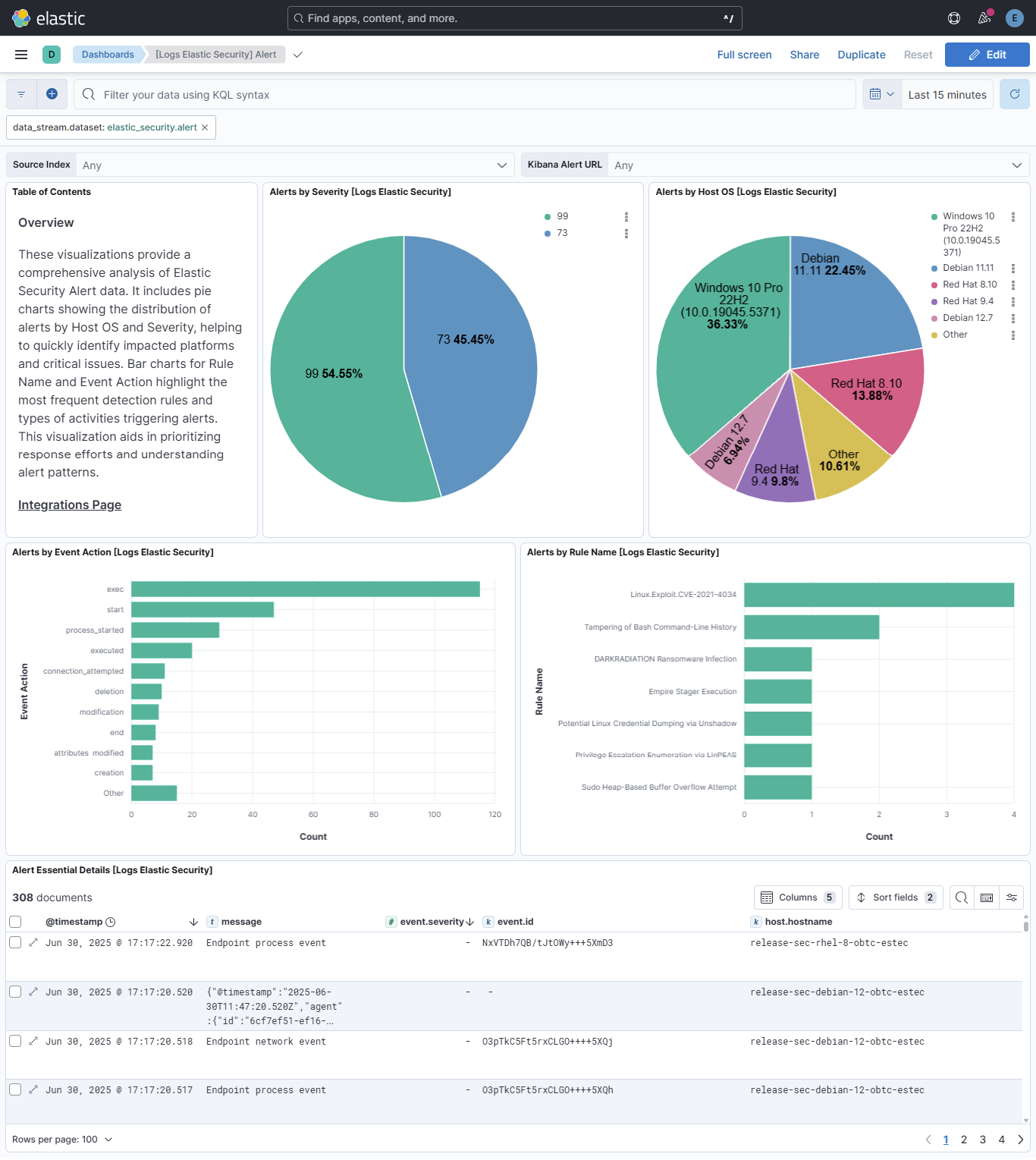
This integration includes one or more Kibana dashboards that visualizes the data collected by the integration. The screenshots below illustrate how the ingested data is displayed.
Changelog
| Version | Details | Minimum Kibana version |
|---|---|---|
| 0.7.1 | Bug fix (View pull request) Remove the package-level conditions.agent.version condition, which made Fleet silently drop this integration's inputs from agents older than the condition. |
9.4.0 |
| 0.7.0 | Enhancement (View pull request) Update Elastic Managed integration documentation to the current wording and docs links. |
9.4.0 |
| 0.6.0 | Breaking change (View pull request) Migrate alert data stream authentication from required_vars to var_groups for improved UX and cleaner configuration management. Bump Kibana and Elastic Agent requirement to ^9.4.0 to support this feature. Add Fleet input validation for duration fields and URL scheme restrictions. Breaking change: the authentication settings moved from the data stream to the integration policy level. After upgrading, edit each existing Elastic Security integration policy and re-enter the credentials (API key, username/password, or bearer token) for the selected authentication type. |
9.4.0 |
| 0.5.1 | Enhancement (View pull request) Set agentless deployment mode release field to ga. |
9.1.1 |
| 0.5.0 | Enhancement (View pull request) Use new release field for agentless deployment mode to establish as beta. |
9.1.1 |
| 0.4.1 | Bug fix (View pull request) Change page_size/batch_size variable type from text to integer for Fleet input validation. |
9.1.1 |
| 0.4.0 | Enhancement (View pull request) Add support for conditional required fields to handle the authentication type. |
9.1.1 |
| 0.3.2 | Bug fix (View pull request) Generalize install instructions. |
9.0.0 8.18.0 |
| 0.3.1 | Bug fix (View pull request) Fix typo in README. |
9.0.0 8.18.0 |
| 0.3.0 | Enhancement (View pull request) Import ECS definitions in process-specific fields using external: ecs. Convert *.supplemental_groups.id fields to keyword to match ECS data types. |
9.0.0 8.18.0 |
| 0.2.0 | Enhancement (View pull request) Adding SIEM category. |
9.0.0 8.18.0 |
| 0.1.0 | Enhancement (View pull request) Initial release. |
9.0.0 8.18.0 |